A small desktop tool for keeping periodic backups of your Elden Ring saves while you play. It runs in a window, watches for the game process, and copies your save file to a folder you pick, on whatever interval you want.

I wrote the first version of this in raylib a while back for a single save file. This is the rewrite — same idea, but with multiple save profiles, so my vanilla save, my Seamless Co-op save and my randomizer save can each have their own schedule and their own destination without fighting over the same folder.
- Watches for
eldenring.exe. Auto-backups only fire while the game is actually running; when it's closed, the loop pauses. - Manages one or more profiles. Each profile points at one save file (
.sl2,.co2,.rd2) and one destination, with its own interval and its own cap on how many backups to keep. - Finds your save files for you. On Linux it walks your Steam libraries to locate the Proton prefix for Elden Ring; on Windows it looks under
%APPDATA%\EldenRing. If neither finds the file, there's a browse button. - Restores from any previous backup. Before overwriting the live save it takes a pre-restore snapshot of the current file and keeps it for a week, so if you restore the wrong one you haven't lost anything.
- Config is one JSON file at
~/.config/ERSaveBackup/profiles.jsonon Linux, or%APPDATA%\ERSaveBackup\profiles.jsonon Windows.
You need:
- Odin — a recent release.
- Skald — the Odin GUI framework this app is built on.
- A Vulkan loader — comes with recent AMD / NVIDIA / Intel drivers on both Linux and Windows. If
vulkaninfoworks, you're fine; otherwise install the Vulkan SDK. - Windows only: MSVC build tools (launch the build from an "x64 Native Tools" command prompt or a Developer PowerShell so
cl.exeis on PATH).
Clone Skald next to this repo:
parent-dir/
├── Skald/
└── ERSaveBackup/
Then on Linux / macOS:
./build.sh          # compile to ./build/ersavebackup
./build.sh run      # compile and launch
Or on Windows:
build.bat           :: compile to build\ersavebackup.exe
build.bat run       :: compile and launch
If you keep Skald somewhere other than ../Skald, point GUI_PATH at your checkout — export GUI_PATH=/path/to/Skald on Linux, or set GUI_PATH=C:\path\to\Skald on Windows.
The Windows script also copies SDL3.dll out of Odin's vendor\sdl3\ and drops it next to the built .exe; without it, the binary won't start.
-
Launch the app. The profile list on the left will be empty on first run.
-
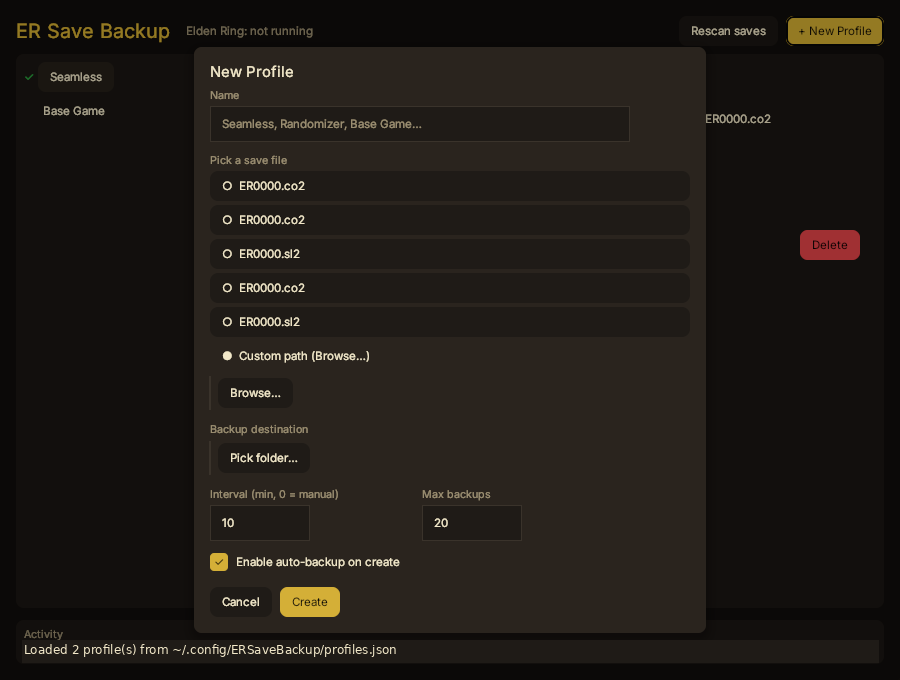
Click + New Profile. The dialog lists every Elden Ring save file it found on your system — pick one, name the profile, point it at a destination folder, set an interval and a max backup count, and hit Create.
-
Open Elden Ring. The header flips to Elden Ring: running once the app sees the process, and auto-backups start ticking on your interval. When the game closes they pause again.
-
Back Up Now takes an immediate backup regardless of game state — useful before you do something you're not sure about.
-
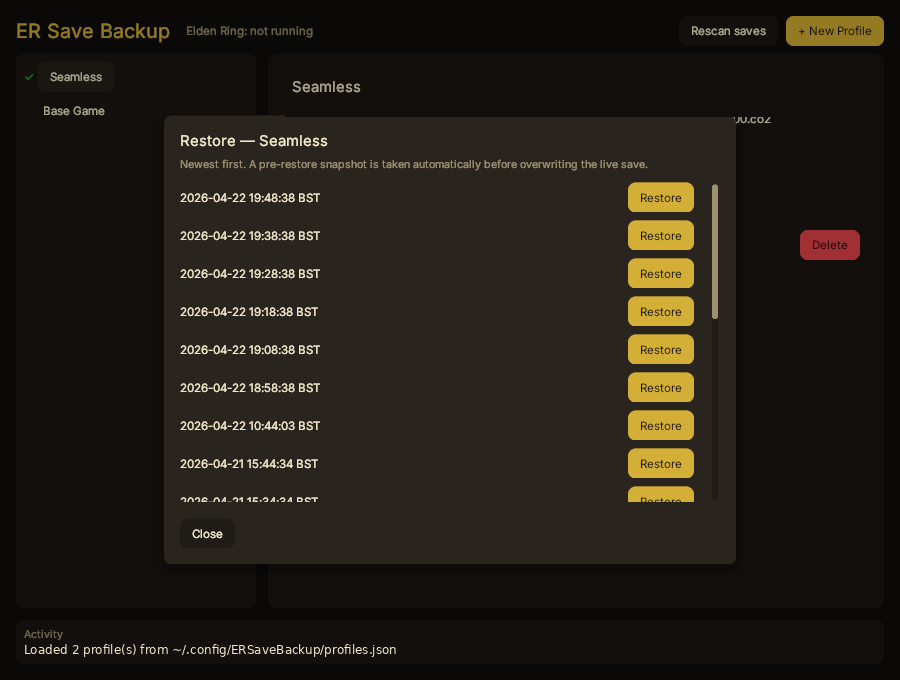
Restore… opens a list of every backup for the selected profile, newest first. Click Restore next to the one you want. The app takes a pre-restore snapshot of the current live save, then overwrites it.


- The green tick next to a profile in the list means auto-backup is armed for that profile — auto-backup is enabled and the interval is greater than zero. It doesn't mean a backup is happening right now; actual copies only fire while
eldenring.exeis running. - Don't restore while Elden Ring is running. The app blocks this on purpose: copying over a save file the game has open is how saves get corrupted.
- Pre-restore snapshots (
*_prerestore_*files in your backup folder) don't count towards the per-profile max-backups cap, so restoring doesn't push older normal backups out. They auto-delete a week after they were taken. - Timestamps in filenames are in your local time, not UTC. Your OS timezone is used.
- Closing the window stops all backup loops.
- The Odin language and its standard library.
- Skald — the Odin GUI framework this is built on.
- The old raylib version of this tool, which this replaced.
MIT — see LICENSE.